Arpeggiator
Everything you want from a modern arpeggiator, from Gate to Programmable steps and Keysync.
Video Tutorial:
Tempo
Change the overall tempo. Is shared with MIDI Tempo.
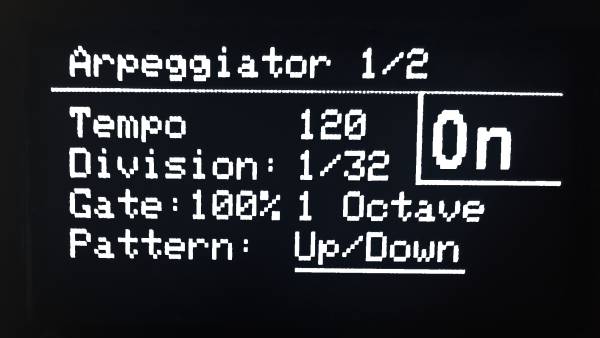
Division
Choose the division. Options: 1/4, 1/6, 1/8, 1/12, 1/16, 1/24 and 1/32.
Gate
Choose the length of the note between 10% and 100%.
Octaves
Amount of octaves the pattern will be played. Between 1 and 4 octaves.
Pattern Types
Choose the pattern between the following options:
- Up: Playing notes up
- Down: Playing notes down
- Up/Down: Playing notes up and down
- Up/Down 2: Playing notes up and down, repeating the extremitites.
- Random: Playing the notes in random order.
- Double up: Playing up, repeating each note twice.
- Double down: Playing down, repeating each note twice.
- Order: Notes are played in the order they have been pressed.
Swing
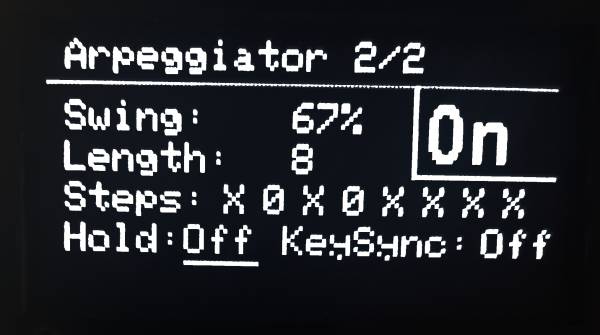
Change the amount of swing. 50 % is straight, more than 60 % or less than 40 % will be a strong swing.
Length & Steps
Define the length of the pattern (1 to 8 steps). Steps lets you select if a note is on or off.
Hold
Keeps the latest note even if not pushed anymore. New pressed keys will reset the arpeggiator
Key Sync
If on, resets the arpeggiator pattern to the first step whenever a new key is pressed, ensuring the sequence starts in sync with the played note.